Accessioning and Precustodial Work
Precustodial work is all work that occurs before a collection is formally transferred to the Rose Library. It includes the packing, shipping, and receiving of material, as well as managing the paperwork required to formally transfer a collection or item. Collection Services staff should be prepared to work with donors, vendors, and curators to provide guidance on any precustodial actions taken by the Library.
1.1 Consultations with donors
Prior to a collection being acquired by the Rose Library, The Head of Collection Services may consult with curators to draft an Operational Impact Statement to assess the overall space and supply needs of a collection, as well as cost of transfer, accessioning, processing, and storing a collection.
Additionally, collection services staff may meet with donors or curators to provide guidance and assistance on matters such as:
- Packing and shipping
- Transfer of of born-digital material (see forms and procedures here)
- Appraisal
- Arrangement and description
- Conservation
1.2 Collections receiving
Collections receiving is the physical transfer of collection material from a donor, individual seller, or vendor to the Stuart A. Rose Manuscript, Archives, & Rare Book Library. The primary point of contact for collections receiving for Emory University Archives at the Rose Library is the University Archivist. The primary point of contact for collections receiving for all other units at the Rose Library is the Accessioning & Collections Manager.
1.2.4 Receipt of New or Potential Acquisitions
All collection material should be received and opened/unpacked by the Accessioning and Collections Manager.
Small packages will be delivered to the Rose Library mailroom. Larger packages or collections will be delivered to the main Woodruff mailroom. The main Woodruff mailroom on Level 2 is not a secure space and collection material should be moved to a secure holdings location as soon as possible upon arrival.
New Acquisition Storage:
Acquisitions that measure 10 linear feet or fewer will be unpacked and stored on the new acquisition storage shelves on Level 9, given space. Larger acquisitions will be moved to additional holding spaces on Level 9 or 11. Hard drives storing born digital collection material should be securely stored in the Digital Archives lab while awaiting accessioning. In some circumstances, material may be received at the Library Service Center (LSC). All new acquisitions should be labelled with the collection title, date of receipt, and temporary box number upon receipt. The Accessioning and Collections Manager will log all new acquisitions in the pending acquisitions tab on the Master Shelf List.
Upon receipt of a collection the Accessioning and Collections Manager will:
- Open and unpack the collection
- Add material to either the Gift or Purchase Acquisitions Log as appropriate
- Place the items and any accompanying documentation onto the appropriate shelf for curatorial review
- Alert the Curator that material is ready to be reviewed (Curator will make final decision on whether to move forward with the acquisition)
If the curator decides to not move forward with an acquisition, it is the curator’s responsibility to notify the donor/seller. The Accessioning and Collections Manager can help coordinate return of the material, once the donor/seller has been notified by the curator.
1.2.5 Paperwork
No collection material may be cataloged or accessioned until the appropriate paperwork has been received. All paperwork should be transferred to the Accessioning and Collections Manager.
Managing Paperwork in Box
Rose staff stores and manages all acquisitions-related paperwork on Box. Box allows staff to access shared folders and communicate with one another inside the application, creating and maintaining a record of communications for each acquisition.
There are two Box folders that we use to manage this process-the Rose Library Purchase Payments folder and the Rose Library Gift in Kind process folder. Each of these folders is subdivided by step in the acquisition process and then by major collecting area. As new collections move through the acquisitions process, the Accessioning and Collections Manager will update the files and move the paperwork into a folder associated with the next stage of the process. As paperwork moves through the process, the Accessioning and Collections Manager will use the tagging and task list functions in Box to update Rose Library and LITS staff members about the status of the acquisition or to alert someone when an action is required.
Paperwork Required for Purchase Payment
The Rose Library requires the following forms for purchases:
- Invoice (Collections Manager will generate an invoice to accompany a Deed of Sale)
- Payment Request Form (PRF)
- Deed of Sale (for purchases from private individuals)
- Domestic Vendors: Supplier/Individual Information Form (SIIF) and an ACH Payment Authorization Form (ACH)
- International Vendors: W-8BEN-E (businesses)/W-8BEN (individuals) and Foreign Wire Transfer Form
- Vendor Forms are required when:
- The seller is new
- The Rose Library has not purchased from the seller within the last 14 months
- The seller’s information (including address) has changed since we last purchased material from them
Managing Purchase Paperwork in Box
The Rose Library manages purchase paperwork on Box through the Rose Library Purchases Payments Folder. This folder is organized into subfolders by process step and then by collecting area.
- Step 1: Received and Pending
- Curators or Accessioning and Collection Manager upload preliminary paperwork for prospective acquisitions such as invoices, One-Pagers, or Appraisal reports to this folder.
- Accessioning and Collection Manager either confirms that a seller is an active vendor with the University or new vendors and sellers to obtain vendor paperwork.
- Accessioning and Collection Manager confirms that all required paperwork has been submitted and combines the vital documents into one file. Vital documents include the invoice, the Deed of Sale, vendor documents, if applicable, and the PRF.
- File titles should be structured to include the vendor name, invoice number and fiscal year. For example: “Vendor or Seller Name_Invoice Number_Fiscal Year,” such as “John Doe Bookseller_123456_FY17.”
- Once all paperwork is submitted, the file moves to step 2.
- Step 2: Submitted PRFs
- Accessioning and Collection Manager tags the Associate Director and Director to approve the disbursement of funds.
- Director or Associate Director will approve in the Box comment section.
- Once the purchase has been approved, the file moves to step 3.
- Step 3: Verified
- The Accessioning and Collections Manager tags the Administrative Assistant for submission to ServiceNow.
- The Administrative Assistant submits the paperwork for payment via ServiceNow.
- The Administrative Assistant leaves a Box comment indicating the submission of the payment along with the REQ number associated with the ServiceNow request.
- Once the paperwork has been submitted to ServiceNow:
- The Accessioning and Collection Manager tags the Budget Analyst and the Senior Accounting Assistant in LITS Finance to alert them for their tracking purposes.
- The Accessioning and Collections Manager tags the accessioning team on purchases including manuscript material to alert them that the material can now be accessioned.
At the end of each fiscal year, the Accessioning and Collections Manager moves all completed paperwork in the Step 3 folder for purchases into a new subfolder titled “FY–” (e.g., FY16).
Paperwork Required for Gifts in Kind
The following paperwork is required to process and accession gifts:
- Signed Gift in Kind Form (required for all gifts)
- Deed of Gift (required for manuscript collections that a donor or appraiser values over $5000, or collections with any terms, conditions, or restrictions imposed by the donor)
NOTE: For gifts containing only books, the Rose Library only requires a Gift-in-Kind Contribution Form in order to proceed with cataloging, but Emory’s department of Development and Alumni Relations (DAR) may require additional paperwork and an appraisal, depending on the value that the donor places on the gift. In this case it is DAR’s responsibility to pursue documentation beyond the Gift in Kind form.
Managing Gift Paperwork in Box
The Rose Library manages gift paperwork on Box through the Rose Library Gift in Kind Process folder. This folder is organized into subfolders by process step and then by collecting area. The Accessioning and Collections Manager is responsible for combining paperwork into a single PDF file, moving that file between the Box folders, and tagging appropriate parties for next steps.
- Step 1: Gifts Received by Collections Manager
- Curators or Accessioning and Collections Manager upload preliminary paperwork for prospective acquisitions. This could include one pagers, appraisal reports, or Box Notes detailing conversations and negotiations with donors.
- Curators are responsible for procuring the appropriate paperwork from donors.
- All files should follow the naming convention: “Donor Name_Calendar Year Received,” such as “John Doe_2016.”
- Once an acquisition has a completed Gift in Kind form, and, if necessary, a Deed of Gift, the Accessioning and Collections Manager moves the paperwork to the Gifts Ready for Acknowledgement by Rose Director folder.
- Step 2: Gifts Ready for Acknowledgement by Rose Director
- The Accessioning and Collections Manager notifies the Administrative Assistant with a Box tag.
- The Administrative Assistant drafts an acknowledgement letter and facilitates getting it signed by the Director.
- The Administrative Assistant sends the acknowledgement letter and leaves a note in Box with this information.
- At that point, the Accessioning and Collections Manager moves the documentation to Gifts Ready for DAR Acknowledgement folder.
- Step 3: Gifts Ready for DAR Acknowledgment
- The Accessioning and Collections Manager tags the Director and Assistant Director of Development for the Libraries on Box.
- DAR will acknowledge the gift and file a copy of the Gift in Kind in their records.
At the end of the calendar year, the Accessioning and Collections Manager moves all completed paperwork in the Step 3 folder for gifts into a new subfolder for the calendar year.
Unsolicited gifts are documented in the Step 1: Gifts Received by Collections Manager, usually with a Boxnote, but may be represented with a letter, or other documentation from the donor. When creating a Boxnote for an unsolicited gift, include contact information for the donor, the contents of the gift, the physical size of the gift, and the date of arrival. The Administrative Assistant is responsible for following up with the donor to obtain proper paperwork.
1.2.6 Financial Appraisal
Collections may be appraised in two circumstances, if a donor would like to take a tax write off on a gift or if curators need a professional evaluation to determine a fair purchase price for a prospective acquisition. It is the donor’s responsibility to arrange appraisals for tax purposes.
Collection Services staff may occasionally be called on to assist in coordinating and facilitating financial appraisals of Rose Library collections or potential acquisitions. While we can facilitate the work of professional appraisers, Rose Library staff cannot provide or estimate a value for any special collections material per the ACRL Code of Ethics for Special Collections Librarians, nor can we provide any tax advice to donors.
If a curator or administrator chooses to engage an appraiser, they must schedule the appointment with the appraiser and contact the Accessioning and Collections Manager or Head of Collection Services as early as possible.
Once an appraisal is scheduled, the Accessioning and Collections Manager will:
- Reserve the Folio Room for the appointment
- Notify Research Services staff
- Move the material to the Collections Transition Room (CTR) in advance of the visit
- Return material to its holding location when the appraisal is concluded
Invoices for an appraiser’s services should be directed to the Administrative Assistant. Appraisal reports prepared for collection material we are acquiring should be provided to the Accessioning and Collections Manager, who will post them to Box for everyone’s access.
NOTE: this is the only instance when unaccessioned and uncataloged material should be stored in the CTR and/or made available in the Reading Room. Collection Services is not responsible for assisting the appraiser with any billing or travel issues; those inquiries should be directed to the Rose Administrative Assistant.
1.3 Accessioning
Accessioning is the formal act of taking legal and physical control of an archival or manuscript collection. Formally accessioning material helps to establish the authenticity of the material through documenting chain of custody. It also gives the Rose Library administrative and custodial control over collections and shows that the library is acting in good faith when accepting archival material by documenting the transfer and its terms.
The Rose Library aims to make all new acquisitions available to researchers immediately following accessioning. Therefore, accessioning new material requires sufficient description to make the collection discoverable and usable. Material must be described at minimum at the box level, but other descriptive information may be limited. Detailed processing is not common at this time, though may be warranted (e.g. the collection is quite small, researcher need is high).
Determine the appropriate level of processing at the time of accessioning and then move forward with creating the descriptive documents.
1.3.1 Managing Accessioning Workflow
When material has been either acknowledged or paid for and is ready to be accessioned the Accessioning and Collections Manager will share this information with the accessioning team.
- When new acquisitions are ready to be accessioned, the Accessioning and Collections Manager tags the accessioning team in Box.
- The Accessioning and Collections Manager maintains a whiteboard with all new manuscript acquisitions and marks the ones that are ready for discussion at the weekly accessioning meeting.
- During this meeting, the Accessioning and Collections Manager updates the team on the status of pending collections and gives information on any significant, new collections that have entered the acquisitions process.
- The accessioning team members add collections to their individual accessioning queues based on current workloads and specific expertise.
- The Accessioning and Collections Manager distributes original paperwork for the new assignments.
1.3.2 Creation of the Accession Record
The system of record for accession information is the Accessions Database located on
the F: Drive at F:/MARBL/Accession Database/Manuscript Accessions.mbd. All new
collection material receives a record in this database upon receipt.
Navigating the Database and Using Microsoft Access
To create the accession record, from the main menu of the accession database select “Edit Existing Records.” At the next menu choose “Edit Accession Records.” This will open the database to the first record. At the bottom of the page, click the double arrow, which will progress the database to the last record. Make note of the accession number on the last record.
To add a new record, click “Add Record” at the bottom of the page, and a blank form will open.
Populating the Accesssion Record
Below is a sample record in the accessions database. The record should be as fully fleshed out as you are able to make it with the information available to you. Not all fields are required for each new accession, but it is the intent to capture as much information about the collection and its transfer as you can at this stage.
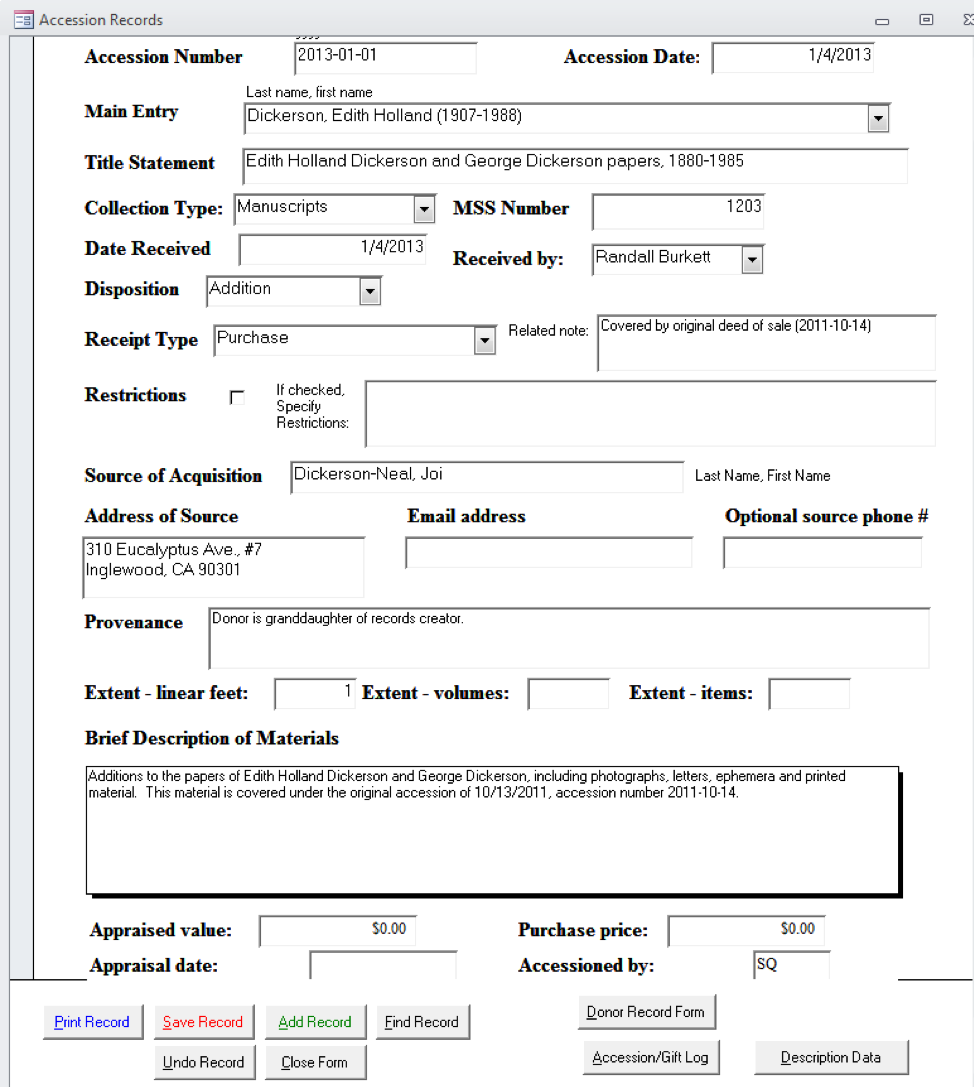
How to complete the accession record:
| Accession Number: | All collection material acquired by the Rose Library is assigned a unique accession number, consisting of the year, the month, and the next accession number in sequence for the month [e.g., 2017-06-34]. To determine which number to use, arrow back to the previous accession record. |
| Accession Date: | This field will pre-populate with the current date. |
| Main Entry: | Determine if the collection is a new acquisition or an addition to an existing collection. If the material is being added to an existing collection, the accession database will automatically fill in the title statement and manuscript number when you begin to type in the main entry. If you are establishing a new collection, follow [THESE RULES]. |
| Title Statement:. | Assign a DACS compliant title to the collection by following [THESE RULES]. |
| Collection Type: | Choose “Manuscripts” from the dropdown menu. |
| Manuscript Number: | A manuscript collection number is prefixed by MSS and followed by a sequential number e.g., MSS 1301. If the accession is an addition to an existing collection, the manuscript number field will populate automatically when you select the appropriate main entry or title statement. If you are establishing a collection, consult the Manuscript Register housed on Box (link) to determine the next available manuscript collection number. Once the manuscript number is assigned and entered into the database, add the new. manuscript number, title statement, and acquisition date to the Manuscript Register on Box. |
| Date Recieved:. | This field auto-populates with the current date. |
| Received By:. | Fill in this field with the name of the curator or staff person responsible for bringing in the collection. You can either type a name into this box, or there are some pre-populated names you can select from the menu. |
| Disposition: | Choose either “Addition” or “Establish Collection” from the drop-down menu. |
| Receipt Type: | Choose either “Gift,” “Purchase,” “University Archives Transfer,” “Deposit,” or “Other” from the drop-down list. In the majority of cases the acquisition is either a gift or a purchase. |
| Related Note:. | The Related note field next to Receipt type field is used to note special information about the material, for example that the acquisition is covered by a previous deed of gift or that the value of items purchased in foreign currency has been converted to dollars. For example:
|
| Restrictions: | Note any restrictions stipulated by the deed of gift or sale in this field. There is a character limit on this field, so if there is restriction information that cannot be contained in this field use this field to refer readers to the “Brief Description of Material” field and record restriction information there. |
| Source of Acquisition: | Record the immediate source of acquisition here. This is generally the name of a donor or a rare book and manuscript dealer and can be found on invoices, deeds, and other acquisition paperwork. |
| Address/Email Address/Phone Number of Source: | Populate these fields with the contact information for the Source of Acquisition. The address field is required, and the record will not save if this field is blank. If you do not have an address for the source of the collection you should enter “address unknown.” Email and phone number should be filled out if the information is known. |
| Provenance: | In the Provenance field, explain the relationship of the donor to the creator of the records. For example, “Donor is creator of records,” or “Donor is executor of creator’s estate.” For collections that are purchased from a dealer with no other known provenance or custodial history information record that the collection was “Purchased from dealer; provenance unknown.” If you have additional information about how the records changed hands over time it should be recorded here. For additional guidance on recording provenance [SEE HERE] |
| Extent: | Record the extent of the material, using linear footage when possible. Many new accessions will be single items added to existing collections, in which case number of items can be used for extent. |
| Brief Description Materials: | The Brief Description of Materials field should include a of description of the creator and a clear description of the materials. Specific language is used in this field to indicate whether the acquisition is a new collection or an addition to an existing collection. In some cases an addition to a collection will come from a different source or have a different provenance than the original materials. In these cases it is particularly important that we be able to track which items came from which sources. In miscellany collections or instances where the addition is very small (a few files), write the accession number on the folder and integrate the folders into the collection and note the Box and Folder number in the Brief Description of Materials field. For large additions, note the box numbers in the field and add the new custodial history information to the note in the finding aid [LINK]. |
| Appraised Value/ Appraisal Date: | If a collection has been financially appraised or the donor has filled out the “Value” line on the Gift in Kind form record that information in this field along with the date of the appraisal or GIK. If a collection has been appraised and is then purchased by the Rose Library do not include the appraised value in this field, you will record the actual purchase price in the Purchase Price field. |
| Purchase Price: | Record the purchase price of the item(s) or collection. If the invoice reflects an international currency, convert to dollars and include the original purchase price in the Related Notes field. |
| Accessioned By: | Add your initials. |
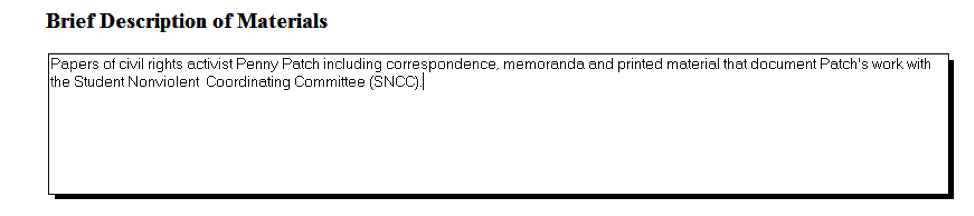
Figure 2: Example of the Brief Description of Materials field to indicate the establishment of a new collection.
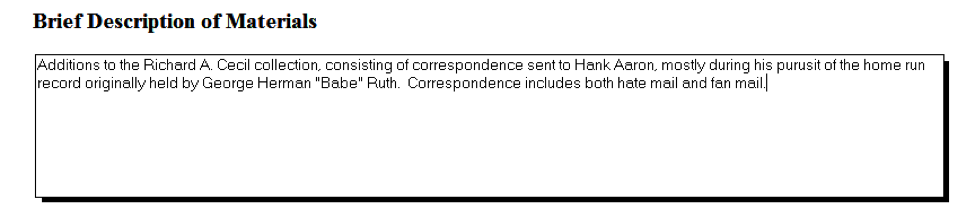
Figure 3: Example of the Brief Description of Materials field to indicate the addition to an established collection.
Finalizing the Record
When you have finished filling out the record, press the Save Record button. Use the Print Record button to print at least two copies of the record, one for the collection file and one for the accession files.
If you assigned a new manuscript number, press the Description Data button, then click Fill Data, then Save. This creates an entry in the database’s Manuscript Register.
1.3.4 Accessioning Digital Objects
In order to ensure consistency across accession records, archivists should use the digital archives controlled vocabulary to describe digital objects.
Typically, if we receive laptops or personal computers, we will only retain the internal hard drive following processing. The Digital Archivist will send all other hardware and casings to surplus. You should therefore describe laptops and computers as “hard drives” in accession records (see the digital archives controlled vocabulary below). If we do have reason to keep the entire computer (either because they feature labels and markings intentionally added by the donor/creator that contribute significant meaning or because the entire computer will be required in order to access and transfer files), describe these as either “laptop computers” or “microcomputers.” Consult with the digital archivist if you are unsure of which term to use.
Apart from exceptional cases, you should not accession computer peripherals (monitors, keyboards, etc.), networking hardware (routers, for example), and other electronic components not used to store data unless:
- They feature labels and markings intentionally added by the donor/creator that contribute significant meaning to the collection. These should not be labels or markings that simply denote ownership or give instruction on use or function (e.g., “Dorothy’s mouse” or “plug in here”).
- In cases where the associated hardware is particularly old or obscure and it has been deemed likely, following consultation with a digital archivist, that this equipment will be required in order to access and transfer digital files from the associated hardware.
If you have questions about whether a digital object should be accessioned, consult the digital archivist.
Accessioning Workflows
Like all collection material, born digital media and files should not be accessioned until paperwork has been completed. The workflow will vary slightly depending on the method of transfer or if the born digital material is part of a hybrid collection.
If a hybrid collection includes known born digital media and/or hardware:
- During the weekly accessioning meeting, the Accessioning and Collections Manager assigns hybrid collection to a member of the accessioning team.
- The accessioning archivist adds information regarding any known born-digital media and/or hardware to the born-digital inventory, which is stored as a tab in the master shelf list.
- The accessioning archivist accessions the born-digital media and/or hardware with the rest of the collection, using the digital archives controlled vocabulary (listed below) to describe what is included.
- Archivists should keep smaller pieces of born-digital media such as floppy disks or flash drives with the collection when moved to the stacks. The Digital Archivist and Accessioning and Collections Manager will identify a storage location for computer towers and laptops. The accessioning team member will shelve the computer and record the location in the born-digital inventory and the master shelf list.
- If it is a small amount of born digital material (i.e., less than 50 floppy disks), the accessioning archivist should create the disk images for the collection. This decision can be made in consultation with the digital archivist.
If a collection (or addition to a collection) is comprised exclusively of born-digital media and/or hardware:
- The Accessioning and Collections Manager notifies and assigns accessioning responsibilities to the Digital Archivist. Born digital media and/or hardware is temporarily stored in the accessioning area until retrieved by the digital archivist for accessioning.
- The digital archivist accessions the born-digital media and/or hardware, using the digital archives controlled vocabulary to describe what is included.
- Where possible, the digital archivist will image disks and ingest disk images into the digital repository at the point of accessioning.
- The digital archivist adds information about the file transfer to the born-digital inventory, which is stored as a tab in the master shelf list. The archivist should also note whether they have ingested the material into the digital repository.
- The digital archivist creates BD box(es) for accessioned media, including hard drives removed from laptops and computer towers. If it is not possible to remove a hard drive from its casing, the location of the hardware will be recorded on the master shelf list and the born digital inventory.
NOTE: If imaging is completed at the time of accessioning, born-digital media and hardware can be transferred immediately to the LSC.
If a hybrid collection includes a file transfer:
- The receiving digital archivist notifies the Accessioning and Collections Manager that a file transfer has been received.
- The receiving digital archivist moves the transferred files to a temporary storage location on the digital archive lab’s local hard drives. Due to preservation concerns, the digital archivist may ingest transferred files into the digital repository prior to the completion of accessioning.
- During the weekly accessioning meeting, the Accessioning and Collections Manager assigns hybrid collection to a member of the accessioning team.
- The accessioning archivist adds information about the file transfer to the born digital inventory, and notes whether they have ingested the files into the digital repository.
- The accessioning archivist accessions the file transfer with the rest of the collection, using the term “Digital files” taken from the digital archives controlled vocabulary to describe what is included.
If a collection (or addition to a collection) is comprised exclusively of a file transfer:
- The receiving digital archivist notifies the Accessioning and Collections Manager that a file transfer has been received.
- During the weekly accessioning meeting, the Accessioning and Collections Manager assigns the collection to a digital archivist.
- The digital archivist accessions the file transfer, using the term “Digital files” taken from the digital archives controlled vocabulary to describe what is included.
- The digital archivist ingests the transferred files into the digital repository.
- The digital archivist adds information about the file transfer to the born-digital inventory, and notes that files have been ingested into the digital repository.
| Digital Archives Controlled Vocabulary | |
|---|---|
| Compact disc | Describes CDs (all types) | |
| Digital files | Describes files received via file transfer, as opposed to original media |
| Disk drive | Describes external hard drives and other types of portable, external drives, including flash drives |
| DVD | Describes DVDs |
| Floppy disk | Describes floppy disks (all sizes) |
| Hard drive (external) | Describes external hard drives and other types of portable, external drives, including flash drives |
| Hard drive (internal) | Describes a hard drive that has been extracted from a tower or laptop |
| Laptop computers | Describes a complete laptop computer |
| Microcomputers | Describes personal computers and towers |
| Monitor | Describes computer monitors (and any other peripherals) |
| Zip disk | Describes zip disks |
1.3.6 Creating the CL-2 file
The permanent collection files document the history of a collection including, solicitation, acquisition, processing, and later communications with the donor. They will contain transfer paperwork such as deeds of gift or sale and supporting documentation such as invoices, donor correspondence, paper inventories, and other items that help the Rose Library manage and administer the collection.
When we receive a new collection, the accessioning archivist is responsible for creating the collection file and adding a copy of the accession record and any other collection documentation to the newly created file. The collection file’s label should include the main entry and the manuscript number. The files are stored alphabetically by main entry.
If you pull a collection file from the cabinet for longer than a brief time, you must fill out an “out” card with the collection title, your name, and the date. When you return the file, remove the out card and add the date you returned it. One might pull a file while accessioning an addition, processing a collection, or to assist a researcher. Much of the information contained in the collection file is sensitive, and the files are considered confidential. Biographical information, restrictions, rights information, summary collection histories, and inventories may be shared with students and researchers if appropriate.
Electronic CL-2 File (Vital Docs File)
We also maintain an electronic vital documents folder which you will need to create or update when accessioning a new acquisition. Vital documents include the accession records, PRFs, invoices, appraisal reports, Deeds of Sale, Gift-in-Kind Contribution Forms, and Deeds of Gift but do not include supplemental or secondary paperwork such as one-pagers, inventories, and dealer descriptions. To update this file:
- For new acquisitions:
- Scan the vital documents.
- Create a folder in
F:/MARBL/CL-2 Vital Docsusing the naming convention “Main Entry MSS XXXX.” - Title the document with the accession record number (e.g. Year-Month-Accession Number) and save the PDF by in the new folder.
- For additions:
- Scan the deed of gift/sale or the gift in kind form as a PDF.
- Title the document with the accession record number (e.g. Year-Month-Accession Number) and add to existing collection folder.
- If a folder does not exist, create a folder using the naming convention “Main Entry MSS XXXX,” and add the existing file to that folder, as well as the new file just created, named with the accession number.
1.3.7 Accessioning Checklist
- Create accession record
- Create CL-2 file (both paper and electronic)
- Arrange and rebox collection
- Create or update finding aid
- Encode finding aid
- Create or update catalog record
- Barcode box(es)
- Update information in Box folder with accesion number
- Add collection to shelf list
1.4 Stacks Management
The Accessioning and Collections Manager is responsible for maintaining the physical spaces where collection material is housed. The Accessioning and Collections Manager will periodically conduct inventories of these spaces and maintain shelf lists and other documentation related to collection storage space.
We contract with Patterson Pope [LINK TO CONTACT INFO] for maintenance of shelving in the stacks. If a compact shelving unit needs service, please notify the Accessioning and Collections Manager who will contact the Facilities Coordinator, who will contact Patterson Pope. During service calls, security will accompany service providers to the floor.
1.4.1 Stack Locations
We have five primary stacks locations:
We communicate stack locations by giving a range and bay for an item.
- Ranges are one side of an aisle. These are numbered, and, in the book stacks, also given an A or B designation.
- Bays are sections of shelving within the range. The bays receive alphabetical designations. When you are looking at a range the A bay will be on your left and proceed through the alphabet to your right.
- Shelves are the individual shelves within a bay.
1.4.1 Shelf Lists
Collection Services and Emory University Archives staff manage the locations of all Manuscript and Archival collections in an Excel spreadsheet located on Box [LINK]. The shelf list is used to record the location and extent of each collection. It includes tabs for MSS collections, EUA collections, the born digital inventory, and unaccessioned material. All staff members and students have reading access to the document, but only collections services and EUA staff can edit the shelf list.
The shelf list should be updated:
- When a new collection is accessioned (physical or born digital).
- When the extent of a collection changes.
- When a collection has physically moved from one location to another.
- When a collection is deaccessioned.
The notes field can be used to record:
- When a collection is being processed.
- Restrictions.
- Unusual location information.
- Notes regarding whether a collection has been deaccessioned or transferred.
The Finding Aid for Books [LINK] provides locations for book collections in the book stacks.